For business owners

Bookings, calendar and team in one place.

Barbers, salons, clinics, gyms and pet groomers take bookings on BOOKniNAM. Customers pick a free time in the customer app. You answer from your phone or on the web.

Account sign-up is not open on this site yet. Contact us and we will tell you when it is.Contact us.

Start on the free plan. There is no payment step to sign up.

See how it works
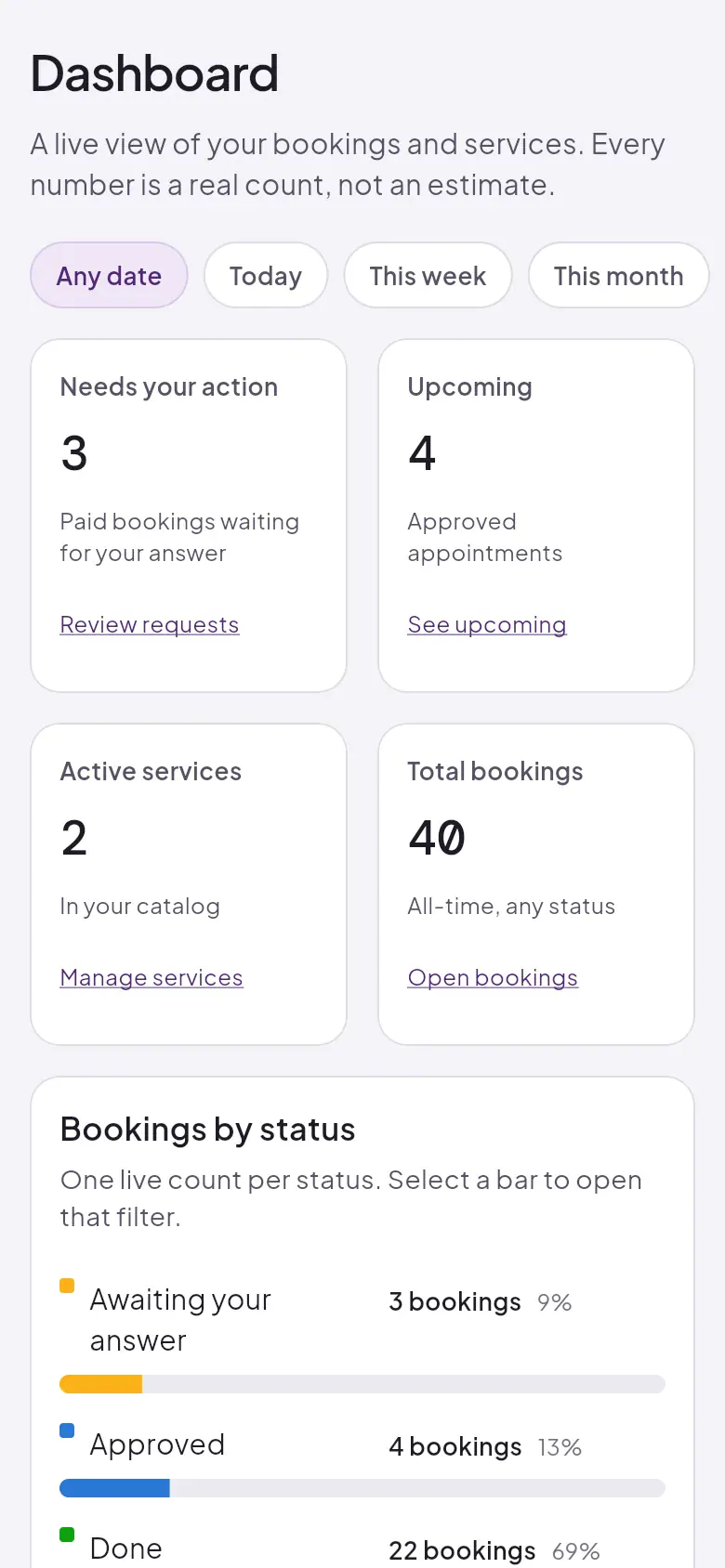
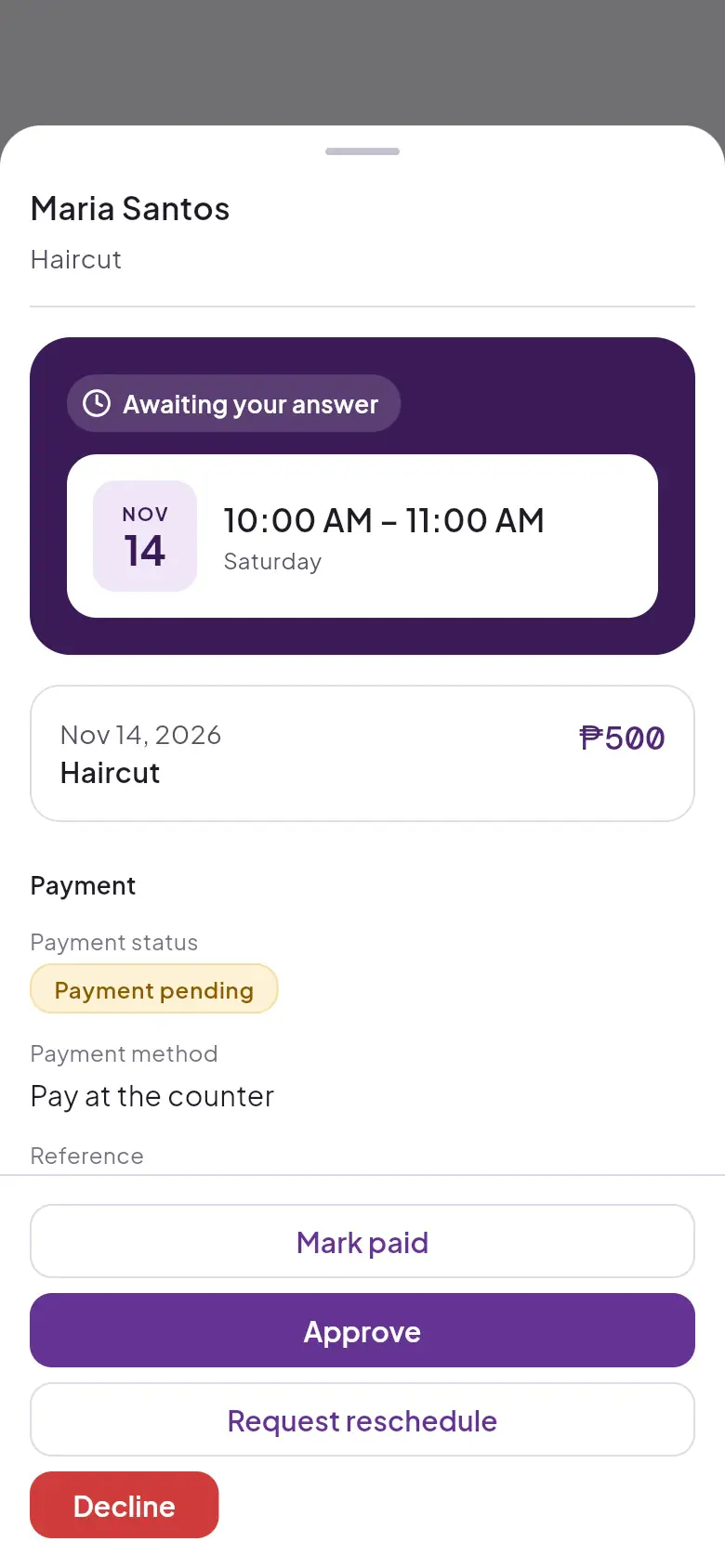
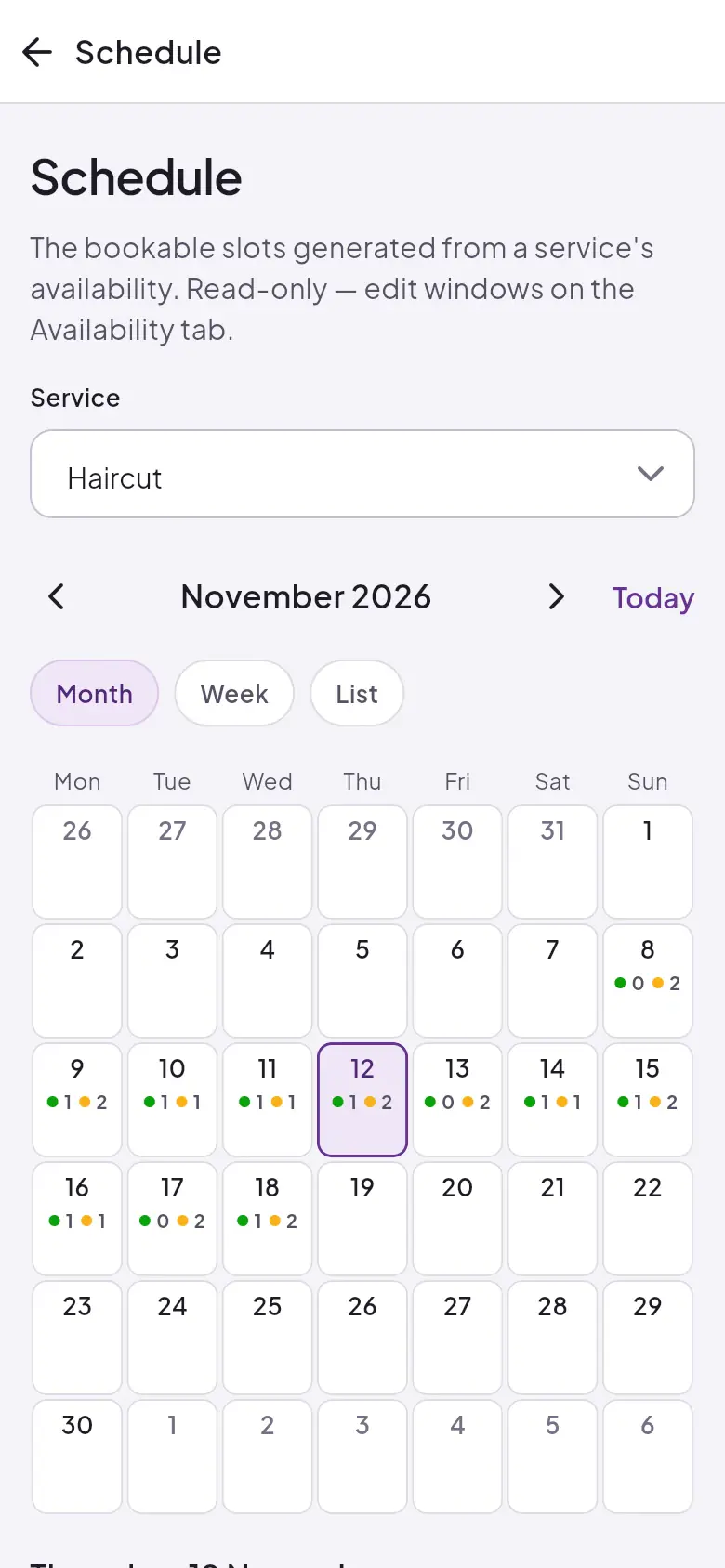
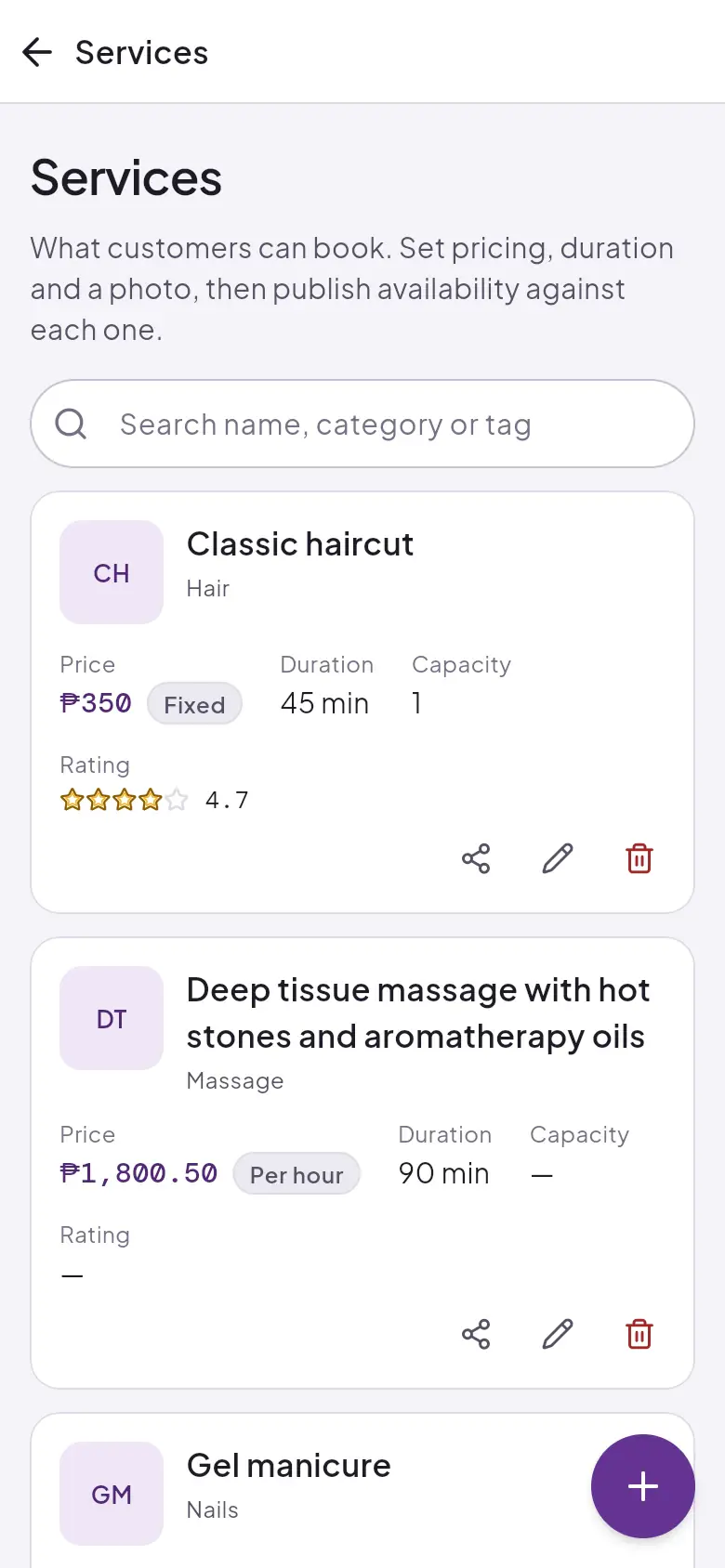
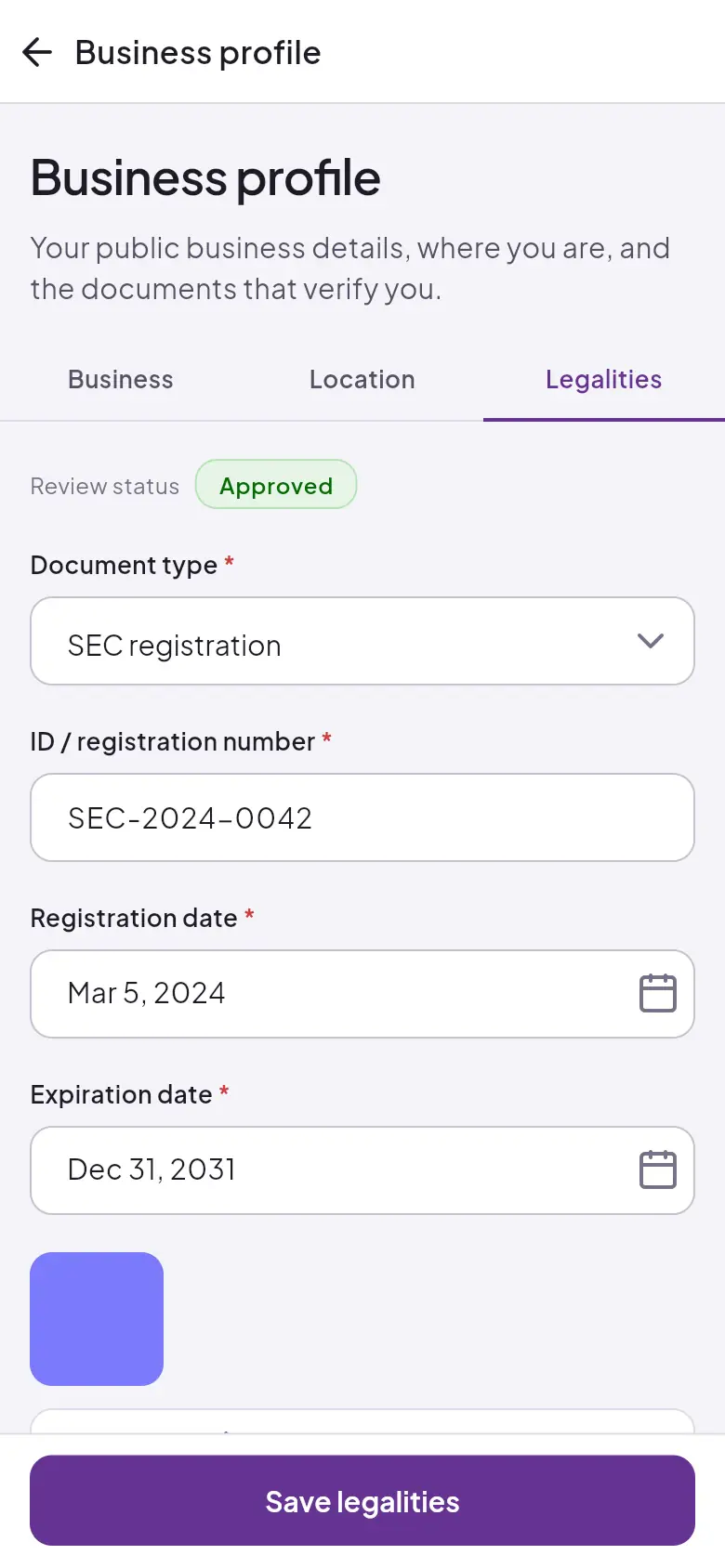
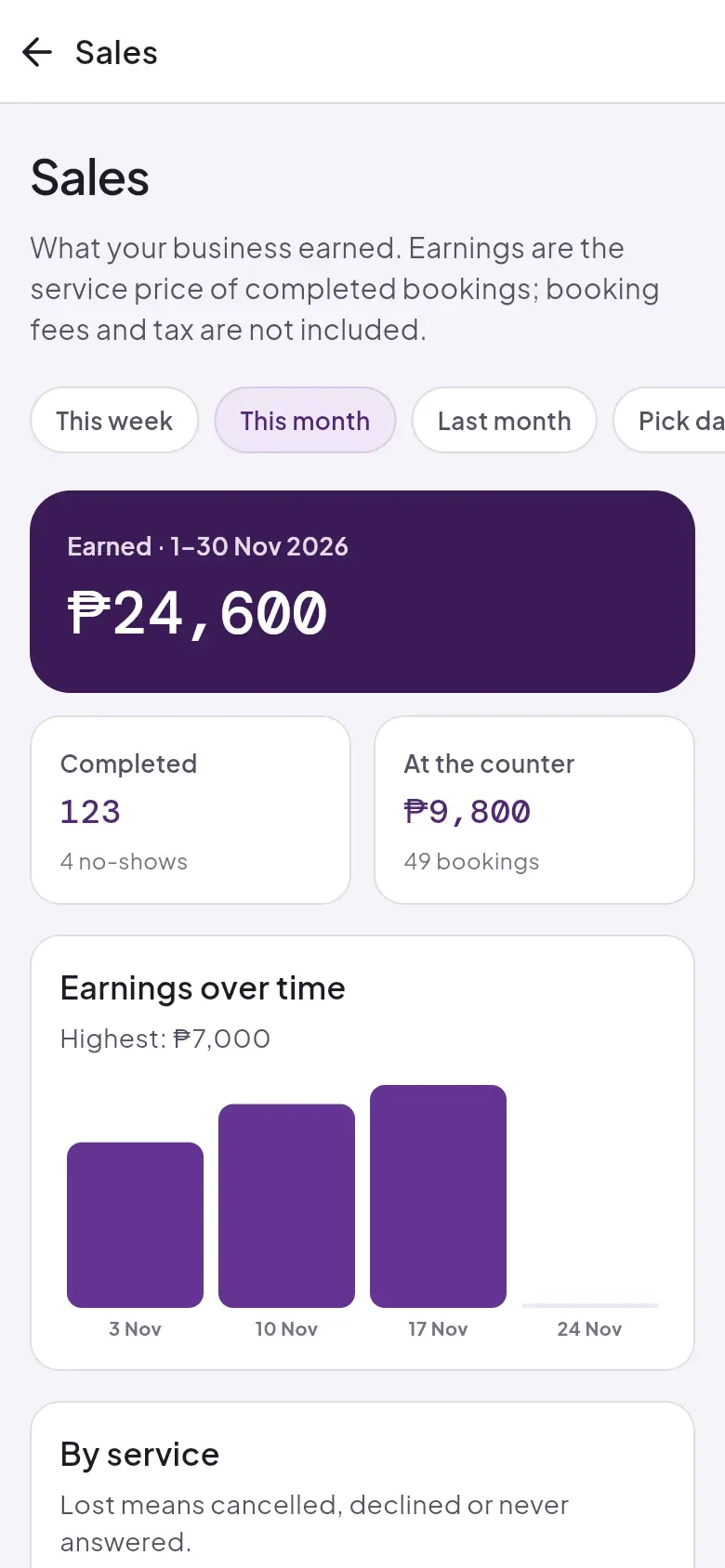
Business app, Dashboard. The Dashboard. Date filters sit at the top: Any date, Today, This week, This month. Four tiles: Needs your action 3, Upcoming 4, Active services 2 and Total bookings 40, each with a link. Below, Bookings by status: Awaiting your answer 3 bookings, Approved 4 bookings, Done 22 bookings. Sample data.Business app, Booking detail: awaiting your answer (Approve / Decline). One booking, Awaiting your answer. Maria Santos booked a Haircut for Saturday, Nov 14, 10:00 AM to 11:00 AM, ₱500. Payment status is Payment pending, method Pay at the counter. Buttons: Mark paid, Approve, Request reschedule and Decline. Sample data.Business app, Schedule: Month. The Schedule for the Haircut service, in Month view for November 2026. Month, Week and List switches sit above the calendar. Days with bookable times carry a green dot for open times and a yellow dot for booked ones, for example 12 November with 1 open and 2 booked. Sample data.Business app, Services. The Services list. Classic haircut, Hair, ₱350 fixed price, 45 minutes. Deep tissue massage with hot stones and aromatherapy oils, Massage, ₱1,800.50 per hour, 90 minutes. Each has share, edit and delete icons. A round add button sits at the bottom right. Sample data.Business app, Business profile: Legalities tab, approved. Business profile, Legalities tab. Review status is Approved. The document type is SEC registration, with a registration number, a registration date and an expiration date, a small preview of the uploaded document and a Replace document button. Save legalities is at the bottom. Sample data.Business app, Sales & reports. Sales. Period buttons: This week, This month, Last month and Pick dates. A purple card shows Earned for 1 to 30 Nov 2026, ₱24,600. Below are Completed 123 with 4 no-shows, At the counter ₱9,800 for 49 bookings, an Earnings over time bar chart and a By service section. Sample data.

Counts of what needs your action and what is coming up, and your bookings by status.

Real app screens with sample data. Names, times and amounts are made up.

Who it is for

Made for businesses that work by appointment.

Pick the industry that fits you when you set up. These are some of the types of business on BOOKniNAM.

  • Barbering
  • Hair Services
  • Nail Care
  • Dental Clinics
  • Massage Therapy
  • Gym & Personal Training
  • Pet Grooming
  • Car Wash & Detailing

The full list has more: tutoring, home services, photography, events and others.

How it works

From sign-up to your first booking.

  1. Open your account

    Sign up with your email and confirm it with a 6-digit code. Then finish five setup steps: you, business, location, documents and plan.

  2. Add services and open times

    List what you offer with a price and how long it takes. Say when you are open. Choose who does what.

  3. Answer bookings

    Customers book a free time in the app. You approve, decline or ask to move it. Mark it paid and done after the visit.

What it does

Five jobs, one place.

Each one below is built in the business app today. The features page has the detail and what is not built yet.

Take bookings

Customers book a free time in the app. You set the services, prices and how long each takes.

More about this
Business app, Services. The Services list. Classic haircut, Hair, ₱350 fixed price, 45 minutes. Deep tissue massage with hot stones and aromatherapy oils, Massage, ₱1,800.50 per hour, 90 minutes. Each has share, edit and delete icons. A round add button sits at the bottom right. Sample data.
The Services screen in the business app. Sample data.

Run your calendar and team

Set when you are open, see the schedule by month, week or list, and add the people who work for you.

More about this
Business app, Schedule: Month. The Schedule for the Haircut service, in Month view for November 2026. Month, Week and List switches sit above the calendar. Days with bookable times carry a green dot for open times and a yellow dot for booked ones, for example 12 November with 1 open and 2 booked. Sample data.
The Schedule screen in the business app, month view. Sample data.

Remind customers

Customers get a reminder on their phone the day before and an hour before, and it shows in their Notifications screen. You are told when a booking comes in or changes.

More about this
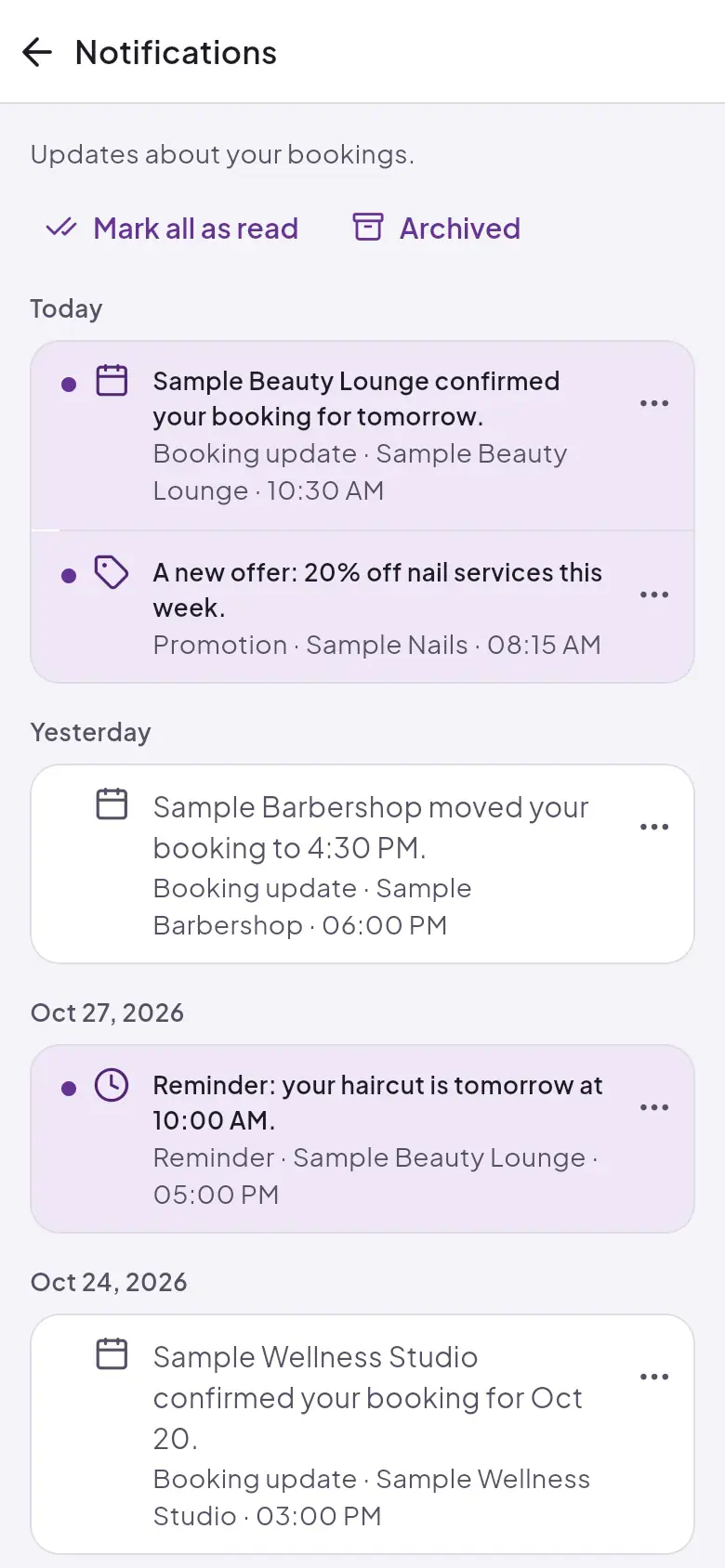
Customer app, Notifications. The customer app Notifications list, as a customer sees it. Under Today, Sample Beauty Lounge confirmed your booking for tomorrow, and there is an offer. Under Oct 27, 2026 a reminder reads: your haircut is tomorrow at 10:00 AM. Mark all as read and Archived are at the top. Sample data.
What a customer sees in the customer app: the Notifications screen. Sample data.

Get verified

Upload a registration document. We check it, and an approved business shows a Verified badge to customers.

More about this
Business app, Business profile: Legalities tab, approved. Business profile, Legalities tab. Review status is Approved. The document type is SEC registration, with a registration number, a registration date and an expiration date, a small preview of the uploaded document and a Replace document button. Save legalities is at the bottom. Sample data.
The Legalities tab of the business profile, with the review approved. Sample data.

See sales and reports

See what you earned for a period, how many bookings were completed, and which services earn the most. Insights in the app show your busiest times.

More about this
Business app, Sales & reports. Sales. Period buttons: This week, This month, Last month and Pick dates. A purple card shows Earned for 1 to 30 Nov 2026, ₱24,600. Below are Completed 123 with 4 no-shows, At the counter ₱9,800 for 49 bookings, an Earnings over time bar chart and a By service section. Sample data.
The Sales screen in the business app. Sample data.

See every feature

The other side

What your customers see.

Customers use the BOOKniNAM customer app. They find your type of business, see your services and prices, and pick a day and a free time. They get a reminder before they come. They pay you at the shop.

Pricing

Free to start.

The free plan has no limit on bookings. It allows up to 3 services and 1 team member. Paid plans with higher limits are being finalised.

See the plan
Questions

Quick answers

Does it cost anything to start?

No. You start on the free plan. It has no limit on bookings and allows up to 3 services and 1 team member. Paid plans with higher limits are being finalised, and we will show their prices before you pay for anything.

How do customers pay?

Customers pay you at the shop, on the day. The app does not take payment for your service. When they pay, you open the booking and tap Mark paid.

What do I need to sign up?

An email address you can open, your business details and address, and a photo or scan of a registration document such as a business permit. You also need your list of services and their prices.

What happens if I do not answer a booking?

A booking you never answer expires when its start time arrives. Anything the customer already paid is refunded, and it counts against your business as no response. Check Needs your action every day.

Can my staff use it?

Yes. You add them by email. They open the app, tap Join the team and choose their own password. You choose who customers can book and which services each person does. Only you can choose the plan, and sales and reports are for the owner.

Do I use the app or the website?

Both work with one account. The website covers bookings, schedule, services, team and your profile. Sales and reports, and the booking link, are in the business app today.

Did not find your answer? Help center Contact us

Book like a boss.

Open your account, add your services, and let customers book the free times.

Account sign-up is not open on this site yet. Contact us and we will tell you when it is.Contact us.

Prefer your phone? Use the business app.

Download BOOKniNAM Business on the App Store (not available yet) Coming soon Get BOOKniNAM Business on Google Play (not available yet) Coming soon

The business app store links are not live yet.